Artificial intelligence in Pyrus
Artificial intelligence (AI) in Pyrus helps solve work-related tasks every day, be they routine activities or breakthrough projects.
Whether it’s client service and support, attracting new customers, product development and improvement, or employee recruitment and training, AI will help you quickly and reliably optimize your most important processes. When you need to find a document or some important information, determine or change the status of a work task, fill out a customer inquiry form, find a solution to a client’s problem and write a response, prepare a concise and accurate summary of a meeting or discussion, AI is always at hand, ready to do all that, and much more.
There are two types of AI-powered helpers in Pyrus:
AI assistant — this is a virtual helper designed for every user of the Pyrus ecosystem. It is integrated into the interface and can analyze information stored in Pyrus to help you handle your work tasks more effectively. The AI assistant can help you:
- quickly make sense of lengthy reports;
- highlight the key points from materials;
- analyze documents;
- convert audio into text;
- find the information you need in the Knowledge Base.
AI bots — these are virtual system users that make it possible for you to automate routine tasks in existing business processes. They are ideal for managers and system admins seeking to optimize procedures, reduce operating costs, and increase profits by automating the execution of instructions formulated in natural language (prompts).
Note: AI functionality is available only in the Pyrus web application.
How to start using AI in Pyrus
AI functionality is available to users on paid plans.
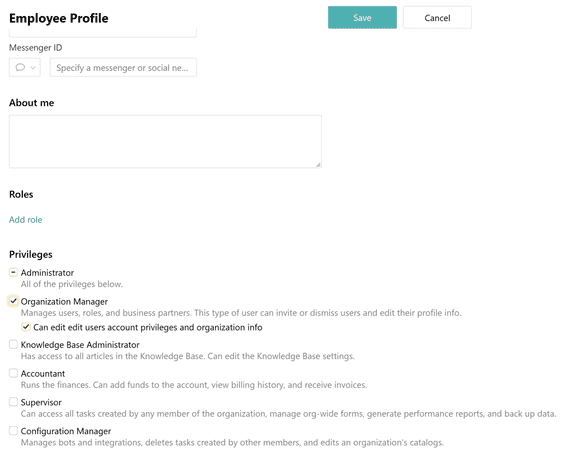
To enable AI functionality in Pyrus, you need Administrator rights in the organization. Organization Manager rights with the additional setting enabled will also work.
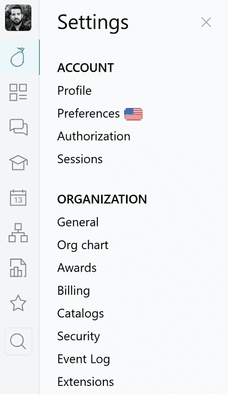
Open the Security tab in the Settings section.
Enable the AI usage enabled setting.
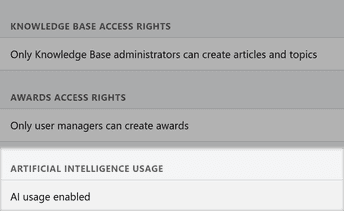
And you’re all set! Now you can give the AI assistant and AI bots tasks.
Tip: You can disable AI functionality in your organization’s Security settings. 
Note: If AI tools are not available for your company, contact Pyrus Customer Support at support@pyrus.com.
Personal data security with AI
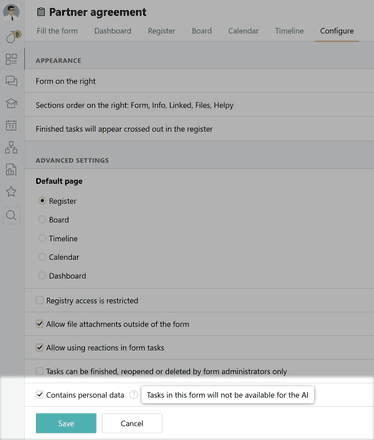
You can supplement the protection of sensitive personal information contained in a form by restricting AI usage specifically for that form.
Open the form settings and check the box in the personal data section. AI will then be restricted from tasks created using that form.
Limits and cost of using AI
Important: Information about token limits and payment applies only to the cloud version of Pyrus. It uses a pay-per-token model. The more data you process, the more tokens you use.
Free allowance
Organizations on a paid plan receive 10 million AI tokens free of charge each month.
The allowance is renewed on the billing date and does not accumulate: any unused balance expires at the end of the month.
Tip: If you need more tokens, just reach out to our support team at support@pyrus.com and we’ll share the details with you.
Controlling expenses
We have made the system transparent so you can easily monitor token usage. Consumption statistics for the last 30 days and your current balance are displayed on your organization’s General settings page.
Note: Detailed information about token limits is available only to users with Administrator or Accountant rights.
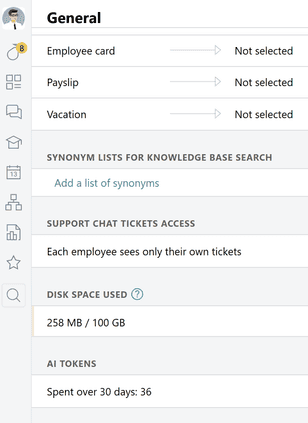
The Billing page displays all token packages, their remaining balances, and their expiration dates.
In addition, each AI bot profile has a separate counter showing how many tokens it has used today and over the past 30 days.
Learn more about using AI bots
What now?
Pyrus offers a wide range of options for implementing AI, both to improve employees’ personal productivity and to automate business processes.
If you want to simplify and speed up your employees’ work with tasks and documents, learn more in the article on the AI assistant.
If you are interested in deep process automation and cost optimization, explore the capabilities described in the article about AI bots.
For general examples of how existing AI tools can be used, we recommend the article AI use cases in business processes.
Turn routine tasks into opportunities. Activate AI in Pyrus and open up new possibilities for business growth!