Server scripts
A server script is a bot with program code attached to it. The code runs on the Pyrus side whenever the bot receives a comment.
Unlike regular bots, server scripts don't require a separate server or a public HTTPS address for the handler. You can quickly set them up and run them right in the Pyrus app with a minimal amount of code.
Limitations and limits
- Language: TypeScript;
- Runtime: Node.js;
- The Node.js standard library is available;
- The preinstalled pyrus-api library is available;
- Network requests are available (both to the Pyrus API and to external services);
- Third-party libraries can't be connected (yet);
- Files can't be written to disk;
- No state is kept between runs (stateless);
- Maximum script execution time: 60 seconds on a paid plan, 1 second on the free plan;
- Maximum number of runs: 10 per 10 seconds;
- Maximum memory usage: 256 MB.
Creating a server script bot
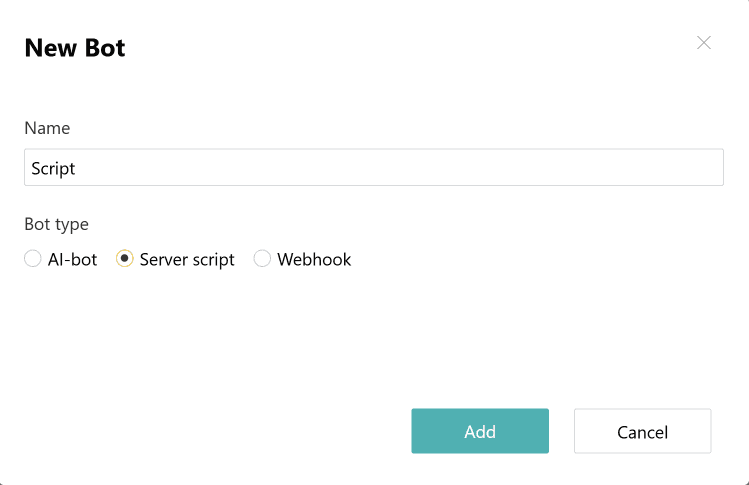
Go to the Bots section and click Add bot in the top right panel.
In the window that opens, enter the bot name, select the Server script bot type, and click Add.
The server script editor opens with sample code.
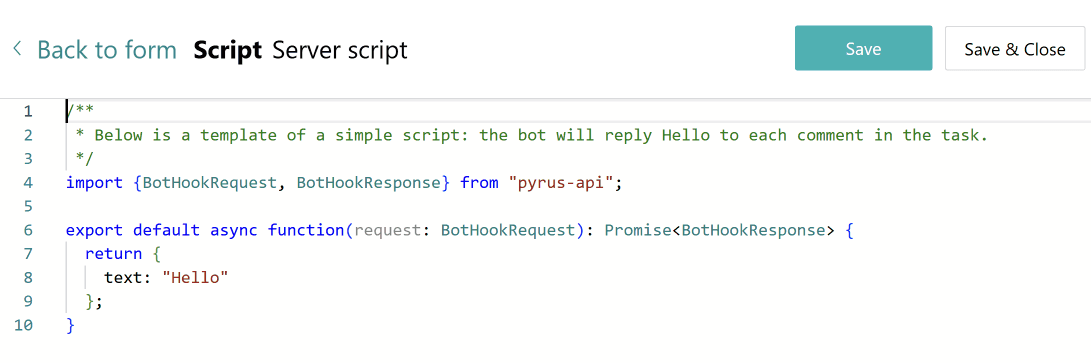
Write your own script or paste a ready-made example. Once you save the changes, the bot is ready to work.
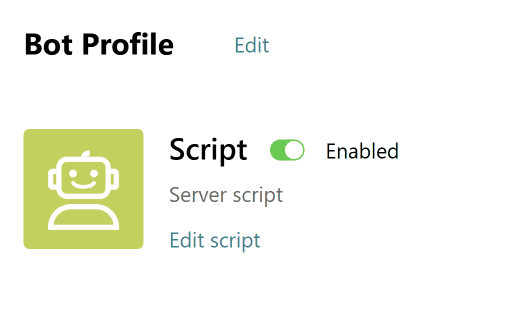
Later, you can open the script editor from the bot profile:
Code structure
The script code must declare a handler function and export it as the default export (export default). The function receives an object similar to the request body sent to a regular bot. It includes the task the bot was called from, the bot settings, and an authorization token for Public API requests.
The simplest script looks like this:
import {BotHookRequest, BotHookResponse} from "pyrus-api";

export default async function(
    request: BotHookRequest
): Promise<BotHookResponse> {
  return {
    text: `Hello ${request.task.author.first_name}!`
  };
}
In this example, the bot greets the task author by name.
Return values
The function must return a result or a Promise with a result. The result can be an empty value (null/undefined) or a task comment — a comment object.
If the function performs asynchronous operations, such as requests to the Pyrus API or external services, it must return a Promise. You can do this explicitly:
import {BotHookRequest, BotHookResponse} from "pyrus-api";

export default function(request: BotHookRequest): BotHookResponse {
    return Promise(resolve => {
        functionWithCallback(() => resolve());
    });
}
but we recommend using the async/await syntax:
import {BotHookRequest, BotHookResponse} from "pyrus-api";

export default async function(
    request: BotHookRequest
): Promise<BotHookResponse> {
    await doSomethingAsync();
}
Important: script execution stops as soon as the function returns a result. Any unfinished asynchronous operations are stopped as well.
import {BotHookRequest, BotHookResponse} from "pyrus-api";

export default async function(
    request: BotHookRequest
): Promise<BotHookResponse> {
    doSomethingAsync();
  //↑ the operation will be stopped
  //  after the parent function returns
}
Autocompletion and type checking
Script code supports TypeScript syntax and types. This doesn't affect how the script runs, but it makes writing code easier and helps you avoid typos. The handler function's argument and return value have the BotHookRequest and BotHookResponse types, available from the preinstalled pyrus-api library: 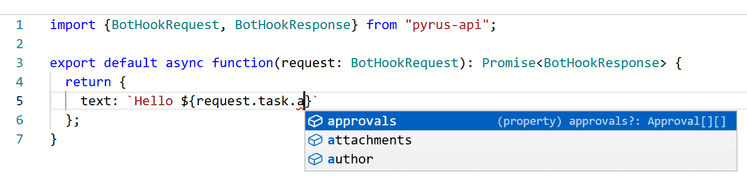 You can use plain JavaScript (without type declarations), but then type checking and autocompletion won't be available while you write code.
Logging
If the script writes information to the console while running (for example, by calling console.log), all console output is saved as a separate bot event. These events are shown on the bot profile page and are useful for debugging.
Error handling
If an exception occurs while the script is running and it isn't caught, the script stops. The bot won't add a comment to the task, and the error text is saved as a bot event on the bot profile page. If the task follows a BPMN process, the process stops at the bot's step. The next time the bot is called, it runs the script as usual.
Exceptions most often occur when accessing external resources:
- Pyrus API requests via the pyrus-api library. If the server returns an error (a non-2xx response code), the library throws an
ApiErrorexception. The exception text contains the response code and the error description. - Requests to external services via
fetch. An exception occurs only on a network error, for example if the service is unavailable. If the service responds with an error (for example, 404 or 500), no exception is thrown: check the response code in theresponse.okorresponse.statusproperties.
To keep the script from stopping on an error, wrap requests in a try/catch block and handle the error in the catch block: for example, report it in a task comment.
import {ApiError, BotHookRequest, BotHookResponse, PyrusApiClient} from "pyrus-api";

export default async function({
    task,
    access_token
}: BotHookRequest): Promise<BotHookResponse> {
    const api = new PyrusApiClient(access_token);

    try {
        const form = await api.forms.get({id: task.form_id});

        const response = await fetch("https://example.com/api/data");
        if (!response.ok)
            return {text: `The external service returned an error: ${response.status}`};

        const data = await response.json();
        // ...process the data
        return {text: `Form "${form.name}": data received`};
    } catch (e) {
        console.log(e);
        const message = e instanceof ApiError
            ? `Pyrus API error: ${e.message}`
            : "The request failed";
        return {text: message};
    }
}
Script examples
Resetting subsequent approvals
If the bot is a task subscriber, it resets all approvals at subsequent steps, if there are any. This is useful when the entire approval chain must be repeated after approval is re-requested at one of the previous steps.
import {BotHookRequest, BotHookResponse} from "pyrus-api";

export default function({task}: BotHookRequest): BotHookResponse {
	const reapproval: number[][] = [];
	let approveFound = false;

	for (let i = 0; i < task.approvals.length; i++) {
		const stepReapproval = [];
		if (task.current_step < i + 1) {
			for (const approval of task.approvals[i]) {
				if (approval.approval_choice !== "waiting") {
					stepReapproval.push(approval.person.id);
					approveFound = true;
				}
			}
		}
		reapproval.push(stepReapproval)
	}

	if (approveFound)
		return {
			approvals_rerequested: reapproval
		};
}
Announcement for role members
If you mention the bot and one or more roles in the same comment, the script adds all members of these roles to the task subscribers. This is useful when you need to notify a group of colleagues about something and get each of them to acknowledge the notification.
import {BotHookRequest, BotHookResponse, PyrusApiClient} from "pyrus-api";

export default async function({
    task,
    user_id,
    access_token
}: BotHookRequest): Promise<BotHookResponse> {
    const lastComment = task.comments[task.comments.length - 1];
    const mentions = new Set(lastComment.mentions);

    if (!mentions.has(user_id))
        return;

    const roles = task.subscribers
        ?.filter(p =>
            p.person.type === "role" &&
            mentions.has(p.person.id)
        )
        .map(r => r.person.id);

    if (!roles?.length)
        return;

    const api = new PyrusApiClient(access_token);

    const membersArrays = await Promise.all(
        roles.map(id => api.role.get({id}).then(r => r.member_ids))
    );

    return {
        subscribers_added: membersArrays.flat().map(id => ({id})),
        subscribers_removed: [user_id, ...roles].map(id => ({id}))
    };
}